
Choosing a Simple Home Media Server
April 22, 2026
Even before the subscription model became as prolific as it is today, I've always preferred to own physical media. Long after iTunes and Spotify became prevalent, I hoarded records and CDs. However, I also (especially as I get busier) value simplicity and convenience. So I choose my own meandering path between ownership and convenience by making logical compromises. When it comes to entertainment - movies, TV, music, radio, audiobooks, etc. - I want to own and manage it all offline. I've come to deeply detest the invasiveness of the modern internet. It's become the opposite of the diverse and interesting place it was in decades past. Discovery of media is much more tortuous, and acquiring it ethically/legally usually requires far more hurdles than it should to truly own rather than rent. Movies and TV are released on digital platforms with mandatory DRM, hardcopy releases are more rare, and DRM-free formats for audio and books are also losing ground.

1. Network Attached Storage (NAS)
To run a media server, you need media storage. A NAS is quite simple to put together using an old PC or Raspberry Pi as a controller, and a generic SATA drive bay. However, it's also true that a prebuilt NAS adds some quality of life baseline improvements. Nice UIs triggering all the scripts you would otherwise need to cobble together and run as needed to manage the instance. Pre-baked role-based authentication to secure access on your local network (and if you decide to enable remote access). From my survey of offerings, the best out-of-box experience as a hardware-software product seemed to be Synology's offering, so I went with a Synology DiskStation DS923+ 4-Bay NAS, which ran about $600 in early 2025. A complement of drives - two Seagate Ironwolf 8TB 7200RPM RAID SATA Drives rounded it out for another $360 total. The 8TB drives are configured in a single RAID setup for at-minium single-drive failure tolerance.2. The Network
I, cruicially, chose to keep my entire media server offline with no VPN endpoint. This means I can't access my media server remotely, but nobody else physically can either. I use a Synology RT6600ax router ($300), for similar reasons as the NAS selection. My home network is single-band (I don't host separate IoT networks because I hate IoT, and I avoid a guest network and separate 2.4GHz network SSID) and everything goes through the router, i.e. I have no LAN connections directly to my modem (an ATT Fiber modem at the moment). I run MoCA (Media over CoAxial) within my house to use the CoAX lines already wired across the 3 floors to distribute high speed Ethernet to the NAS and our media endpoints (TVs, computers). As far as the router goes, can I set up an OpenWRT router and manage it in depth? Yes. Do I necessarily care to spend my time on that? Evidently not. Synology's routers have a nice interface for management, plus RBAC, and from there it is simple to manage my local network's traffic controls. Speaking of traffic controls...3. Online avoidance
Obviously I hate ads. What really bugs me about modern TVs is that they are basically advertising machines and probably sold with minimal markup in anticipation of ad revenue driving the majority of their return to the manufacturer. I could set up a Pi-Hole on my network, but for my TV I just use the simplest solution of setting my local network traffic controls to block all internet traffic to/from the TV and only allow LAN traffic. I don't use streaming services, just my media server and physically connected systems (e.g. game consoles) which may be independently networked as needed. But my TV remains blissfully stupid. Similarly, I do not use Plex. Plex is neat, but it is online, supports a subscription model, and not the right fit for someone using a media server for local media delivery with the intent of having independence from the internet and maximizing ownership of their media.4. A VPN household
In this house, every computing asset (computers, phones, tablets) is using a VPN to mask traffic at all times. This is just a practical privacy measure that is a no-brainer to take. All packets leaving my network are doing so within a VPN tunnel with applied encryption, meaning not even my ISP can sniff those packets and see the contents or complete headers. This isn't out of any paranoia from my ISP, but is useful in many cases to access content in other countries, mask your online presence for ad-revenue based services, etc. I use Mullvad at the moment, which has a great privacy model and robust network of endpoints across the globe. It's become fun to me to see what web providers are most anti-VPN because of the deleterious impact it has on their ability to mine and correlate you as a visitor. In general, my mindset now is to just stop using anti-consumer websites and supporting areas of the internet that are more authentic and useful. In the context of the home media server, all of my media viewing assets with VPNs active are configured to enable non-tunneled LAN traffic, which keeps media access seamless on the home network. I elect not to set up a Wireguard/OpenVPN/Tailscale VPN for the media server itself, as I don't really want to maintain another entrypoint into my home network and manage the vulnerabilities and risk associated. I also don't care to access all that media remotely at the moment.5. Media Mangement Software
As mentioned before, Plex was not the right fit for my use case. I therefore elected to go with Jellyfin. I wanted to store photos, books, files, and deliver music, movies, and TV to devices, and Jellyfin has great support for managing all that simply within the NAS filesystem and doing its own thing to maintain the media registry and deliver to clients. Synology's software once againe excels here. I created a Jellyfin container and configured it, and once loaded in the Synology NAS registry, Synology provides a simple UI for container orchestration and management. It was trivial to get Jellyfin server up, with logging volume mounted on the NAS filesystem, and Synology's software handling the watchdog/availability function. In 14 months of runtime, it has had zero hiccups or outages.6. Availability
Worth mentioning that my NAS, router, and modem are all connected to a UPS, specifically a CyberPower CP1000PFCLCD 600W UPS ($165). This has sufficient chemical battery density to insulate from any surges and keep the network and NAS running through intermittent outages, which are very common in ERCOT-bound coastal Texas. With spinning plate HDDs, it gives me some extra peace of mind, even beyond the RAID configuration that the drives are in.Summary
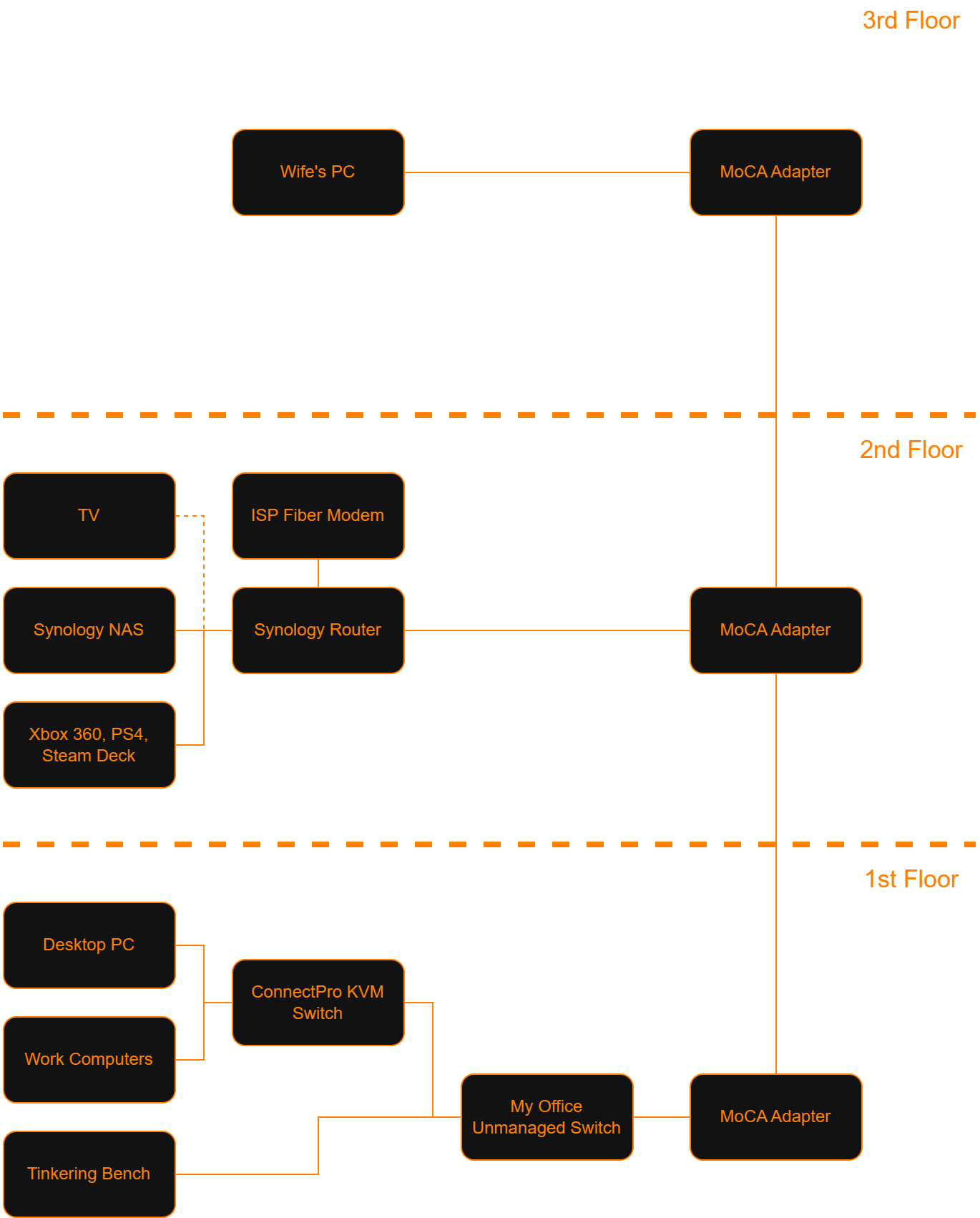 The absolute state of my home network.